Statamic is a joy to build with locally. It is a Laravel application underneath, with a flat-file content store you commit straight to Git, so the whole site travels in your repository. Getting that same site live on a VPS, correctly, is a longer list of steps than the flat-file simplicity suggests.
Deploying Statamic by hand is not one command. It is a sequence: install PHP and the right extensions, pull the code, install production dependencies with Composer, write an .env and generate an application key, clear and warm the caches with Statamic's please command line, set ownership on storage/ and the content directories so www-data can write, configure Nginx rooted at public/ with the Laravel front controller, point PHP-FPM at the right socket, and issue a TLS certificate. Miss one and the site is either down or quietly serving stale pages.
The problem
The first deploy is the one you plan carefully. It is the fifth deploy, the one you do in a hurry after a content update, that bites you. A forgotten php please stache:clear, a static cache still serving yesterday's page, permissions that reset after a git pull, an APP_KEY that changed and locked you out of encrypted values. None of these throw an error at deploy time. They surface later, as a stale homepage, a control panel you cannot log into, or an editor asking why their new entry never went live.
Get a Statamic deploy slightly wrong and you end up with:
- A white screen and a
500, because the config cache still points at the old.env The stream or file "storage/logs/laravel.log" could not be openedfrom a permissions slip after a fresh clone- A homepage that will not update, because the static cache was never invalidated after the content changed
- A control panel that rejects every login, because the
APP_KEYwas regenerated and the sessions no longer match
Every manual deploy is a little different from the last one. Six months in, nobody is quite sure what the correct deploy sequence for this box actually is.
The traditional way: an honest walkthrough
A correct manual deploy of a Statamic site onto a fresh Ubuntu server is not one command. It is roughly a dozen discrete steps that have to happen in the right order, and several of them are the kind of thing that looks fine until a request comes in and it is not. Here is the shape of it, abbreviated rather than spelled out end to end. It assumes the server is already provisioned with Nginx, PHP-FPM and Composer, and that your content lives in the repository, as it does on a standard flat-file Statamic install.
# Pull the code (content travels with it, flat-file first)
cd /var/www && git clone git@github.com:you/your-site.git site && cd site

# Install PHP dependencies for production
composer install --no-dev --optimize-autoloader

# then: cp .env.example .env, set APP_ENV/APP_DEBUG/APP_URL/mail,
# php artisan key:generate, php please stache:clear, config:cache,
# optionally warm Statamic static caching, then fix storage/ +
# bootstrap/cache + content permissions so www-data can write...

# ...plus an Nginx server block rooted at public/ with the Laravel
# front controller try_files (easy to get subtly wrong), point
# fastcgi_pass at the correct PHP-FPM socket, then issue TLS.
Read that as a checklist, not a recipe. It is around a dozen steps, and the ones that bite are silent: a try_files line that is subtly wrong, a fastcgi_pass pointed at the wrong PHP-FPM socket, permissions on storage/ that a git pull quietly resets. None of those error at deploy time. They surface as a 500, a blank page, or a homepage that will not update. On a first deploy you have the patience to get each one right. The problem is that you do the whole sequence again on the next deploy, in a hurry, and it takes long enough that skipping a step feels reasonable, right up until it takes the site down.
The StackPilot App workflow
StackPilot App is a local-first VPS Operations Platform. It runs on your machine, connects to your server over SSH, and turns that entire deploy sequence into a repeatable recipe you trigger with one click. Your credentials never leave your computer, and there is no cloud control plane sitting between you and your server.
Here is the whole flow end to end before we break it down step by step:
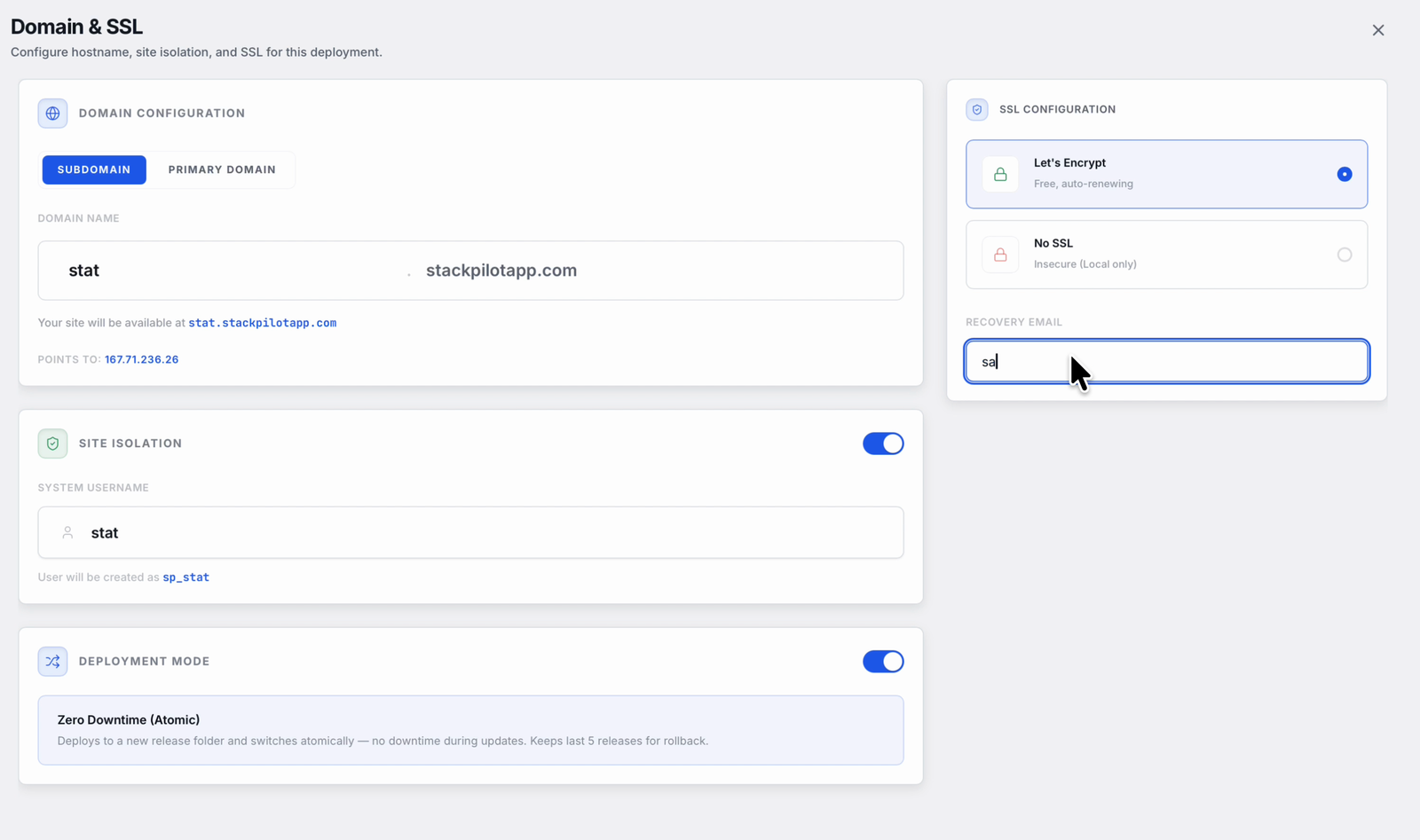
Every deploy runs through the same short wizard. You point StackPilot App at your repository, set the domain and SSL, and pick zero-downtime releases:
Step 1: Connect your repository
Point StackPilot App at your Git repository. GitHub, GitLab or any repo you can reach works, and the connection uses a deploy key so the server can pull without exposing your personal credentials. Because a flat-file Statamic site keeps its content in the repo, that single pull brings the code and the content across together.
Step 2: Create a PHP site rooted at public/
Create a PHP site and point its web root at public/, the way every Laravel and Statamic app expects. StackPilot App writes the Nginx server block with the correct try_files front controller and wires it to PHP-FPM, so the docroot and the front controller are right from the first request.
Step 3: Review the deploy recipe
Instead of a script you maintain in your head, you get a deploy recipe: install Composer dependencies with --no-dev --optimize-autoloader, generate the application key on first deploy, rebuild the config cache, and clear or warm Statamic's caches with the please command line. Every step from the manual walkthrough is here as an editable recipe, and you can add your own commands, an npm run build for a themed front end or a php please static:warm, where you need them.
Step 4: Manage the environment
Set your .env values through the environment manager rather than editing a file over SSH. APP_ENV, APP_DEBUG, APP_URL, mail credentials and any API keys live in one place, applied to the release before it goes live. The APP_KEY stays stable across deploys, so encrypted values and control-panel sessions keep working.
Step 5: Click deploy and watch the logs
Trigger the deploy and StackPilot App runs the recipe over SSH, streaming every line live. You see composer install resolve, the caches rebuild, the Stache clear, the static cache warm. It is not a black box. It is the same commands you would run yourself, in the correct order, every time. Add a TLS certificate for the domain and the site is live over HTTPS.
Automatic deploys on push
Once the site is connected, you can have StackPilot App redeploy on every push. It listens for an HMAC-signed webhook from your Git host, verifies the signature, and runs the same recipe. An editor commits a new entry, or you push a template change, and the deploy you just watched happens on its own.
Why this works
It is worth understanding what StackPilot App actually does, because it is the same work you would do by hand, made repeatable:
- PHP-FPM is managed for you. The site runs against a managed PHP-FPM pool at the version you chose, so there is no mismatched socket path and no forgotten extension.
- The docroot is correct. The Nginx server block is rooted at
public/with the standard Laravel front controller, which is exactly what Statamic needs to route throughindex.php. - The environment is one source of truth.
.envvalues, including a stableAPP_KEY, are applied to the release rather than hand-edited on the box, so sessions and encrypted values survive every deploy. - Releases are atomic. StackPilot App builds the new release in its own directory and only switches the live site to it after the deploy succeeds. A failed build leaves the running site exactly as it was.
- Content deploys straight from Git. Statamic's flat-file content lives in the repository, so a deploy is just a pull, a Composer install and a cache rebuild. There is no separate content database to migrate or sync.
FAQ
Do I still need to provision the server first? Yes. StackPilot App deploys onto a server that already has Nginx, PHP and Composer. If you are starting from a bare VPS, provision it first, then connect your repository and deploy your Statamic site.
Does my Statamic content deploy with the code? On a standard flat-file install, yes. Your content lives in the repository, so the same pull that brings your templates and PHP also brings your entries and collections. There is no separate content database to sync.
How does StackPilot App handle Statamic's caches?
The deploy recipe runs the please command line and the artisan caches as editable steps. Clear the Stache, rebuild the config cache, and warm the static cache if you use static caching, all as part of the same streamed deploy.
Can I run my own commands during a deploy?
Yes. The deploy recipe is editable. Add steps like npm run build for a themed front end, a php please static:warm, or any custom artisan command, and they run as part of the same streamed deploy.
Will a failed deploy take my site down? No. Releases are atomic. The live site only switches to the new release once the deploy succeeds, so a build that fails midway leaves the running site untouched.
What operating systems does StackPilot App run on? macOS is generally available, and Windows is in public beta.
Summary
Deploying Statamic by hand is a long, order-sensitive checklist you run in a hurry and easily fumble: pull, composer install, .env, key, clear the Stache, rebuild caches, warm the static cache, set permissions for www-data, Nginx rooted at public/, PHP-FPM, TLS. The commands are worth understanding once. They are not worth retyping, in the right order, on every deploy. With StackPilot App you connect your repository, create a PHP site rooted at public/, review the deploy recipe, and ship an atomic release with one click, watching every step stream live, with your content travelling straight from Git and your credentials never leaving your machine.
Ready to try it on your own server? Download StackPilot App or explore the features first.