
Next.js is famously easy to deploy on Vercel. Push to Git, and a few seconds later your app is live. The trouble starts when you want it on a server you own, whether that is for cost, for data residency, or because you would rather pay a VPS provider a flat monthly fee than meter every function call.
On your own server, nobody runs next start for you. A production Next.js app is a long-running Node process that has to be built, supervised, put behind a reverse proxy and served over HTTPS. Each of those is a separate job, and each one has its own way of failing quietly.
The problem
A self-hosted Next.js deployment is a small stack of moving parts, all of which have to agree with each other:
- A Node runtime on the server that matches the version you build and test against
- A package manager (
npm,yarnorpnpm) and a clean dependency install - A production build (
next build), which is the most memory-hungry step of the whole process - A process manager such as PM2 or systemd, so
next startsurvives crashes and reboots - An Nginx reverse proxy in front of the Node port, with the right forwarded headers
- Environment variables loaded for the running service, not just your SSH session
- TLS, so the site is served over HTTPS with a certificate that renews on its own
None of this is exotic. It is just a lot of separate pieces to get right on a task you might only repeat every few months.
The pain
The classic first-deploy failure with Next.js is memory. A typical next build peaks at around 1.5 GB of RAM, and it grows with your page count and bundle size. On a small 1 GB or 2 GB VPS, the build either crawls or gets killed by the kernel halfway through, and the error you see rarely says "out of memory" in plain words.
Then come the quieter problems. The app runs fine while your SSH session is open and disappears when you close the laptop. PM2 is running it, but nobody saved the process list, so the next reboot takes the site down. The Nginx block forwards to the wrong port, or drops the Host header, and you spend an evening reading proxy logs. Every redeploy overwrites the running release in place, so for a few seconds visitors hit a half-built app, and if the new build is broken there is no quick way back.
The traditional way: an honest sketch
Here is the shape of deploying Next.js to a fresh Ubuntu server by hand. It is deliberately an outline rather than a copy-and-paste recipe. The point is how many distinct parts there are, not the exact commands for each.
# 1. Install Node and pin it to the version you build against
#    (nvm, NodeSource or a distro package: each behaves differently)

# 2. Pull the code, install dependencies and build
yarn install && yarn build    # memory-hungry: ~1.5 GB peak, more for big apps

# 3. Keep `next start` alive under PM2 (or a systemd unit),
#    and remember to save the process list so it returns after a reboot

# 4. Put Nginx in front of the Node port as a reverse proxy
#    (headers, websocket upgrade, static asset caching...)

# 5. Load env vars for the service, then add TLS with certbot
# ...and build a release/rollback scheme if you want zero downtime
Each comment hides real work: a PM2 ecosystem file or a systemd unit with the right paths, an Nginx server block, an env file the service actually reads, a certificate and its renewal timer. Zero downtime releases and one-click rollback are a project of their own, and most hand-rolled setups simply skip them.
Understanding this pipeline once is worthwhile. Rebuilding it from memory on every new project is not.
The StackPilot App workflow
StackPilot App is a desktop app that sets up and manages your own servers. It is not a hosting company: you bring your own VPS, from any provider, and pay that provider directly. The app connects over SSH and turns the whole pipeline above into a short wizard, with every step streamed to a live log.
Here is the full deploy, start to finish:
Step 1: Pick the Next.js preset
In Sites, start a new deployment and choose the Next.js preset. It comes with Nginx, Node and PM2 already wired together, so you are not choosing those pieces one at a time.
Step 2: Choose your source
Pick a repository from your Git provider and StackPilot App deploys your code as it is. If you only want to try it out, skip the repository and the app scaffolds a fresh Next.js project for you.
Step 3: Domain, isolation and SSL
Enter your domain or subdomain. Turn on site isolation to give the app its own Linux user, so one site cannot read another site's files. Leave zero downtime mode on: each deploy goes into a new release folder and the last five releases are kept for rollback. For SSL, choose Let's Encrypt, which is free and renews automatically.
Step 4: Stack config, with a memory check
Before anything is built, StackPilot App checks the server. If the RAM is tight for a Next.js build, it tells you up front instead of letting the build die halfway through:
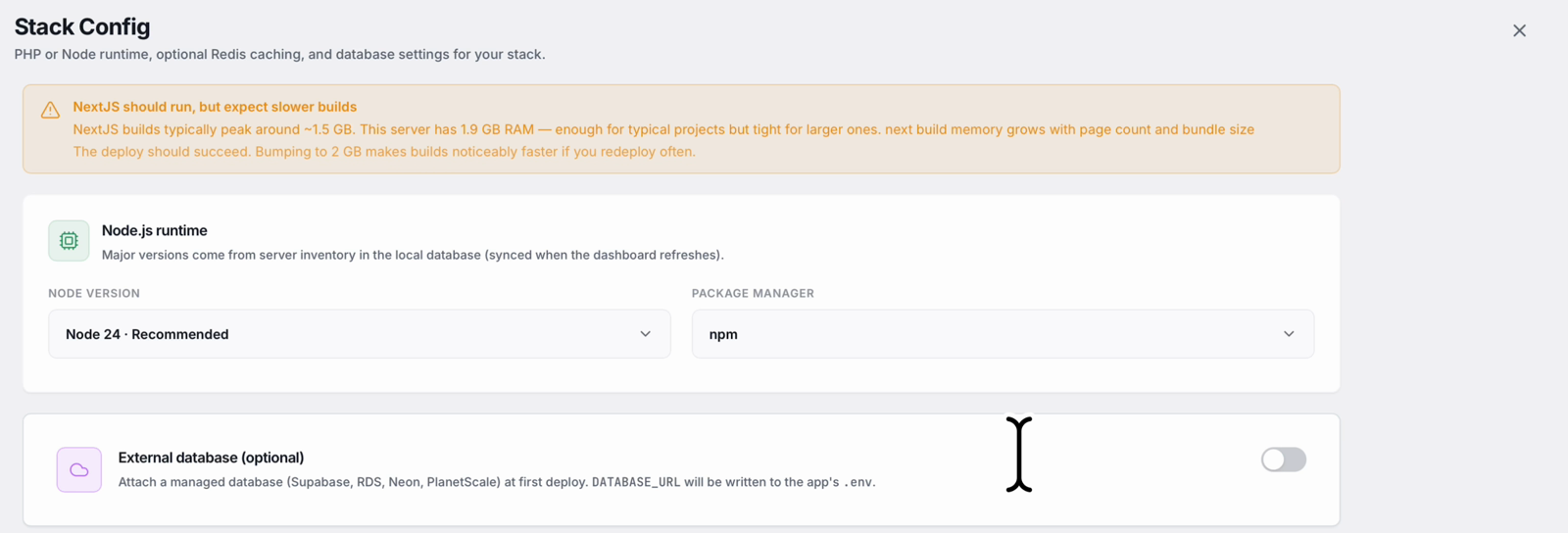
In the demo the server has just under 2 GB, so the warning says the deploy will still succeed but builds will be slower. Below it, pick the Node version (Node 24 is recommended) and your package manager: npm is the default, and yarn or pnpm work just as well. If your app uses a managed database such as Supabase or Neon, you can attach it here and its DATABASE_URL is written to the app's .env.
Step 5: Review and deploy
Launch the deploy and watch the log. StackPilot App creates the isolated user, sets up Node for it, writes a production env file, installs dependencies, and runs the production build (Next.js 16 with Turbopack in the demo). It then switches to the new release, starts it with PM2, puts Nginx in front as a reverse proxy, and issues the SSL certificate. On a small server the whole deploy took about a minute and a half.
Step 6: Manage it afterwards
The site page shows its deployment history with one-click rollback. Environment variables live there too, so you can change them without editing files on the server. Open the domain and your Next.js app is live over HTTPS.
Why this works
It is the same pipeline you would build by hand, done the same way every time:
- Problems are caught before the build. The memory check turns the most common Next.js failure on small servers into a clear warning, not a mystery crash.
- The process is supervised. PM2 runs
next startas a managed service that restarts on failure and comes back after a reboot. - Releases are atomic. Each deploy builds in its own folder and switches over only when it is ready, so visitors never hit a half-built app. If something is wrong, rollback is one click.
- Sites are isolated. Each app can run as its own Linux user, which limits the damage a compromised dependency can do.
- Credentials stay on your machine. StackPilot App connects from your computer over SSH. There is no third-party control plane holding your server keys.
FAQ
Do I need Vercel to run Next.js in production?
No. Next.js runs as a normal Node server with next start. Vercel is a convenient host, but any VPS that can run Node can serve a Next.js app, including features like server components and API routes.
How much RAM does a Next.js build need? A typical build peaks at around 1.5 GB, and larger apps need more. A 2 GB server works, with slower builds. StackPilot App checks the server's memory before deploying and warns you if it is tight.
Can I use yarn or pnpm instead of npm? Yes. Choose the package manager in the stack config step. StackPilot App installs and builds with whichever one you pick.
Does StackPilot App support zero downtime deploys for Next.js? Yes. In zero downtime mode each deploy goes into a fresh release folder, and traffic switches over only when the build has finished. The last five releases are kept so you can roll back in one click.
Can I connect a database like Supabase or Neon?
Yes. In the stack config step you can attach a managed database, and StackPilot App writes its DATABASE_URL into the app's environment.
Which servers and operating systems does it work with? StackPilot App runs on macOS, and Windows is in public beta. It connects to any SSH-reachable Ubuntu or Debian VPS from any provider, and can also provision a new server for you on AWS, DigitalOcean or Vultr.
Summary
Self-hosting Next.js means a Node runtime, a memory-hungry build, a process manager, an Nginx reverse proxy, environment variables, TLS and, ideally, a release scheme with rollback. None of it is hard on its own, but it is a lot to rebuild for every project. With StackPilot App you pick the Next.js preset, set the domain and SSL, choose Node and your package manager, and deploy. The server is checked first, the process is supervised, releases are atomic, and every step is visible in the live log.
Ready to run Next.js on your own server? Download StackPilot App or explore the features first. If you have not connected a server yet, start with setting up a production server.