Your Vue app builds perfectly on your laptop. Getting that same dist/ folder live on a VPS, with deep links that actually work, is where a straightforward job turns fiddly.
A production Vue build is deceptively simple. vite build produces a folder of static files: an index.html, hashed JavaScript and CSS bundles, and your assets. Serving them is "just" a web server pointing at a directory. The catch is history-mode routing. Vue Router rewrites the URL on the client, so a visitor who lands directly on /dashboard/settings asks the server for a file that does not exist. Without the correct Nginx fallback, that deep link returns a 404 instead of loading your app.
The problem
The first page loads fine, which is exactly what makes this trap so easy to fall into. You deploy, you open the homepage, everything works, you move on. Then someone bookmarks an inner route, or refreshes on a nested page, or a customer clicks a shared link, and the server hands them a bare 404. The build was never wrong. The web server was never told that every unknown path should fall back to index.html and let the router take over.
Get a Vue deploy slightly wrong and you end up with:
- Deep links and page refreshes returning
404 Not Found, because there is no SPA history-mode fallback - Stale bundles served to returning visitors, because the caching headers on hashed assets were never set
- A first paint that is heavier than it needs to be, because gzip or Brotli was never switched on
- A site stuck on
http://, because TLS was left as a "later" task and never came back around
Every manual deploy is a little different from the last. Six months in, nobody is quite sure why one site 404s on refresh and its neighbour does not.
The traditional way: where it gets fiddly
On paper a manual deploy is short. You build the bundle, copy it to the server, and point Nginx at it. In outline it looks like this, assuming the server already has Nginx and Node installed:
npm install && npm run build   # produces dist/

# then: copy dist/ to the web root and let Nginx read it, e.g.
rsync -av --delete dist/ /var/www/your-app/
# ...ownership, and the part that actually decides whether the app works:
# an Nginx server block with the SPA history-mode fallback —

    try_files $uri $uri/ /index.html;   # every unknown path -> index.html

# get this one line wrong and every deep link 404s. Plus long-lived
# Cache-Control on the hashed assets, gzip/Brotli, and certbot for TLS.
That is deceptively tidy. It is "just static files", so it reads like a solved problem, and the homepage will load whether or not you got the rest right. The trouble is concentrated in three places that do not announce themselves: the history-mode fallback (miss it and refreshes and shared deep links 404, but only for other people, so you never see it), the caching headers on the hashed bundles (get them wrong and returning visitors are served stale JavaScript), and TLS (easy to defer and never come back to).
None of it is difficult in isolation. The catch is doing all of it correctly, and then doing it again identically on the next release. npm run build, copy dist/, and hope nothing about that server block drifted since last time. It is easy to type and just as easy to get subtly wrong, and the mistake stays invisible until a real visitor trips over it.
The StackPilot App workflow
StackPilot App is a local-first VPS Operations Platform. It runs on your machine, connects to your server over SSH, and turns that build-and-serve sequence into a repeatable recipe you trigger with one click. Your credentials never leave your computer, and there is no cloud control plane sitting between you and your server.
Here is the whole flow end to end before we break it down step by step:
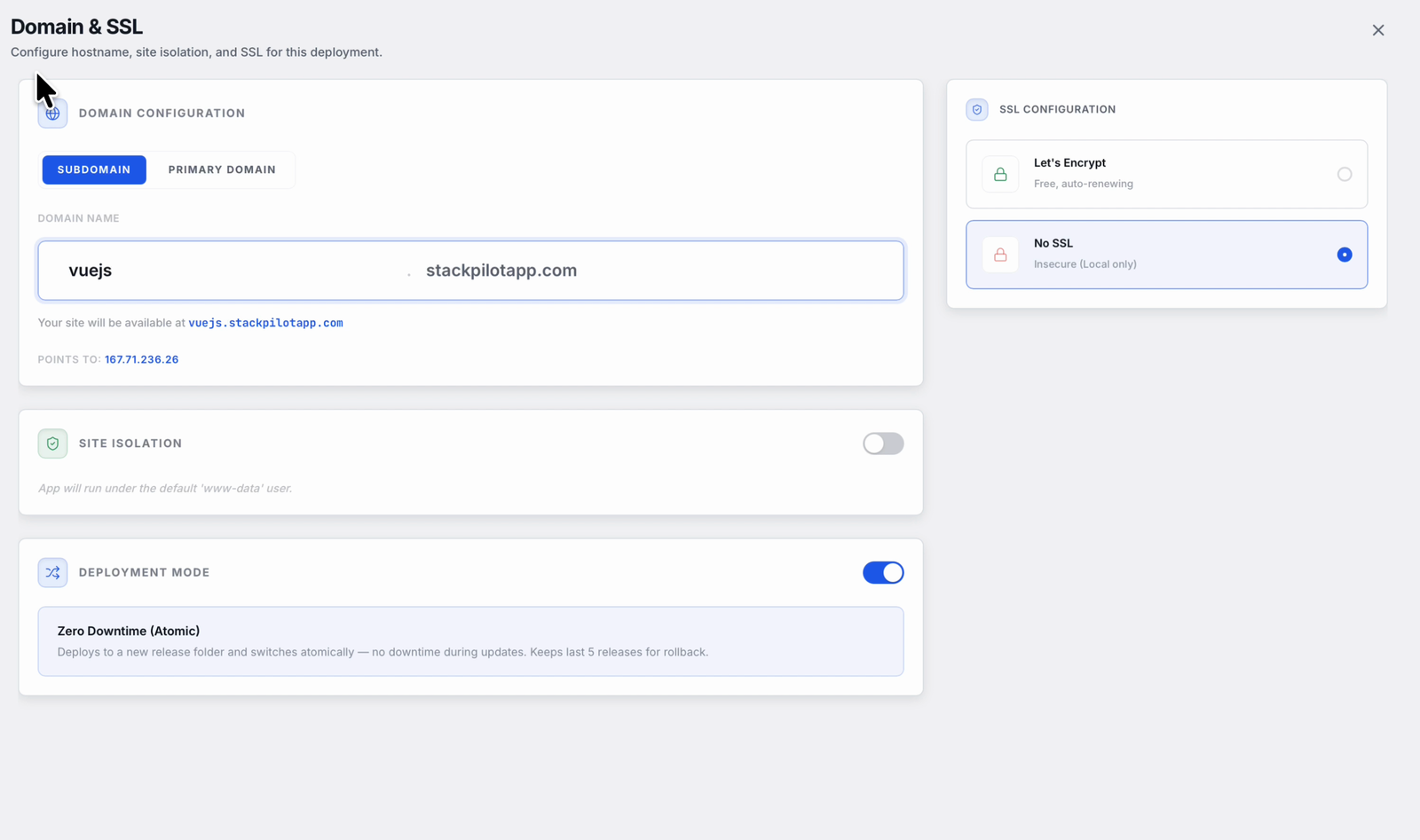
Every deploy runs through the same short wizard. You point StackPilot App at your repository, set the domain and SSL, and choose how the site is served:
Step 1: Connect your repository
Point StackPilot App at your Git repository. GitHub, GitLab or any repo you can reach works, and the connection uses a deploy key so the server can pull without exposing your personal credentials.
Step 2: Choose a static site
Tell StackPilot App this is a static site rather than a runtime app. That single choice is what lines up the correct serving model: a directory of built files behind Nginx, with the SPA fallback in place rather than a reverse proxy to a running process.
Step 3: Set the build command and publish directory
Give StackPilot App the two things a Vue build needs. The build command is npm run build, and the publish directory is dist, which is where Vite writes the compiled site. StackPilot App installs dependencies, runs the build on the server, and takes the contents of dist as the site to serve.
Step 4: Let the SPA fallback be handled for you
Because you chose a static site, StackPilot App writes the Nginx configuration with the history-mode fallback already in place. The try_files $uri $uri/ /index.html behaviour, the caching headers on hashed assets, and gzip are set up for you. The one line that is easy to forget by hand is not something you have to remember.
Step 5: Deploy and watch the logs
Trigger the deploy and StackPilot App runs the recipe over SSH, streaming every line live. You see npm install resolve, npm run build produce the dist/ folder, and the built files move into place behind Nginx. It is not a black box. It is the same commands you would run yourself, in the correct order, every time.
Automatic deploys on push
Once the site is connected, you can have StackPilot App rebuild on every push. It listens for an HMAC-signed webhook from your Git host, verifies the signature, and runs the same build. Push to main, and the deploy you just watched happens on its own.
Why this works
It is worth understanding what StackPilot App actually does, because it is the same work you would do by hand, made repeatable:
- Static hosting with correct SPA routing. The Nginx config serves your built files with the history-mode fallback in place, so deep links and refreshes load the app instead of 404ing. Hashed assets get long-lived caching, and gzip is on.
- Releases are atomic. StackPilot App builds the new
dist/in its own directory and only switches the live site to it once the build succeeds. A failed build leaves the running site exactly as it was, so a broken deploy never blanks the page. - TLS is automated. Certbot issues and renews the certificate, so the site is on
https://from the first deploy rather than as a task you keep meaning to get to. - Deploys are visible. Every step streams live and every deploy is recorded, so "what changed on this site, and when?" has an answer that is not SSH and guesswork.
- Webhooks are signed. Push-to-deploy uses HMAC-signed webhooks, so only a legitimately signed push from your Git host can trigger a release.
FAQ
Why does my Vue app 404 on refresh or on deep links?
Because Vue Router uses history-mode URLs, and the web server has no file at that path. The fix is the SPA fallback: try_files $uri $uri/ /index.html, which serves index.html for every unknown path and lets the router resolve the route. StackPilot App writes this into the Nginx config for you when you choose a static site.
Does this work for other Vite frontends, like React or Svelte?
Yes. Any static SPA build works the same way. Set the build command your framework uses and point the publish directory at its output folder (dist for Vite, build for some setups). The static-site serving model and the history-mode fallback are identical.
What build command and publish directory should I use for Vue?
For a standard Vite-based Vue app, the build command is npm run build and the publish directory is dist. If you use a monorepo or a custom output path, set the publish directory to wherever your build writes the compiled files.
Do I still need to provision the server first? Yes. StackPilot App deploys onto a server that already has Nginx and Node. If you are starting from a bare VPS, provision it first, then connect your repository and deploy the static site.
Does it handle TLS for me? Yes. StackPilot App uses Certbot to issue and renew the certificate, so your site is served over HTTPS without a separate manual step.
What operating systems does StackPilot App run on? macOS is generally available, and Windows is in public beta.
Summary
Deploying a Vue SPA by hand is a short list with one sharp edge: vite build gives you a static dist/, but the server still needs the history-mode fallback, caching headers, gzip and TLS, and the try_files $uri $uri/ /index.html line is easy to omit until a deep link 404s. The commands are worth understanding once. They are not worth retyping, correctly, on every release. With StackPilot App you connect your repository, choose a static site, set the build command and publish directory, and ship an atomic release with the SPA fallback and TLS handled for you, watching every step stream live, with your credentials never leaving your machine.
Ready to try it on your own server? Download StackPilot App or explore the features first.