AdonisJS is a full-stack TypeScript framework for Node, with routing, an ORM, authentication and migrations built in. If you have come from Laravel, it feels familiar on purpose. It is also a framework that really wants a proper server: a long-running Node process, a database, a migration step and a reverse proxy in front.
That makes AdonisJS a poor fit for "serverless" hosting and a great fit for a VPS you control. The work is in getting the production pipeline right: compile the TypeScript, build the frontend assets, run migrations, start the server under a process manager, and only then send traffic to it.
First, which starter kit?
When you create a new AdonisJS project you choose one of four starter kits. The choice shapes your app more than any deployment setting, so it is worth a minute:
- API: a type-safe REST API with authentication and no frontend. Pick it for a mobile app backend, or when the frontend lives somewhere else.
- Hypermedia: pages rendered on the server with Edge templates. It is the classic approach: fast, simple, and very little JavaScript in the browser.
- React and Vue: full-stack kits built on Inertia. You write your pages as React or Vue components, while routing, controllers and auth stay in AdonisJS. You get a modern frontend without building and maintaining a separate API.
All four deploy the same way: a Node server behind Nginx. The Inertia kits add a frontend asset build, which is one more thing that has to succeed before the release goes live.
The problem
A production AdonisJS deploy has more steps than a typical Node app:
- A Node runtime on the server, matching the version you develop on
- A clean dependency install, ideally with the package manager the framework expects
- A production build (
node ace build), which compiles TypeScript and bundles any frontend assets - A production
.envwith a freshAPP_KEY, database credentials and the right host and port - Database migrations, run against the production database at the right moment
- A process manager (PM2 or systemd) so the server restarts on failure and after a reboot
- An Nginx reverse proxy in front of the app's port, and TLS on top
The pain
Most AdonisJS deployment trouble comes from ordering. Run migrations after the new code is already serving traffic and requests hit a schema that is not there yet. Switch Nginx to a release that has not finished booting and visitors get a 502 for the first few seconds, or for much longer if the app crashed on start. Forget to copy .env into the build output and the server refuses to start at all.
Native modules are another trap. If dependencies were installed by one user and the app runs as another, packages with native bindings can fail in ways that only show up at runtime. And as always, a process started from an SSH session dies when that session ends, while a PM2 process list that was never saved is gone after the next reboot.
The traditional way: an honest sketch
Here is the shape of a manual deploy. It is an outline, not a script to paste:
# 1. Install Node, create a deploy user, prepare release folders

# 2. Pull the code, install and build
npm ci && node ace build      # compiles TS and bundles assets into build/

# 3. Write a production .env (APP_KEY, DB_*, HOST, PORT), install prod deps

# 4. Run migrations against the production database
#    ...at the right moment relative to the switch-over

# 5. Start build/bin/server.js under PM2, save the process list for reboots

# 6. Check the app actually responds, THEN point Nginx at its port, add TLS
Every step has an order that matters, and most hand-written deploy scripts get at least one of them wrong the first time.
The StackPilot App workflow
StackPilot App is a desktop app that sets up and manages your own servers. It is not a hosting company: you bring your own VPS and pay your provider directly. It connects over SSH and runs the whole pipeline in the right order, with each step visible in a live log.
Here is a full AdonisJS deploy, including signing up on the live app at the end:
Step 1: Pick the AdonisJS preset
In Sites, start a new deployment and choose the AdonisJS preset. It brings Nginx, Node and PM2 together for you.
Step 2: Choose your source
Pick a repository from your Git provider and StackPilot App deploys your code exactly as it is. If you skip the repository, it creates a fresh AdonisJS project for you.
Step 3: Domain, isolation and SSL
Enter the domain or subdomain. Site isolation gives the app its own Linux user. Zero downtime mode puts every deploy in a new release folder and keeps the last five for rollback. Choose Let's Encrypt for a free, auto-renewing certificate.
Step 4: Stack config and starter kit
Choose the Node version (Node 24 is recommended). For AdonisJS, StackPilot App sticks to npm, because it matches the framework's defaults and avoids native module rebuild problems for the isolated user. Below that is the starter kit picker:
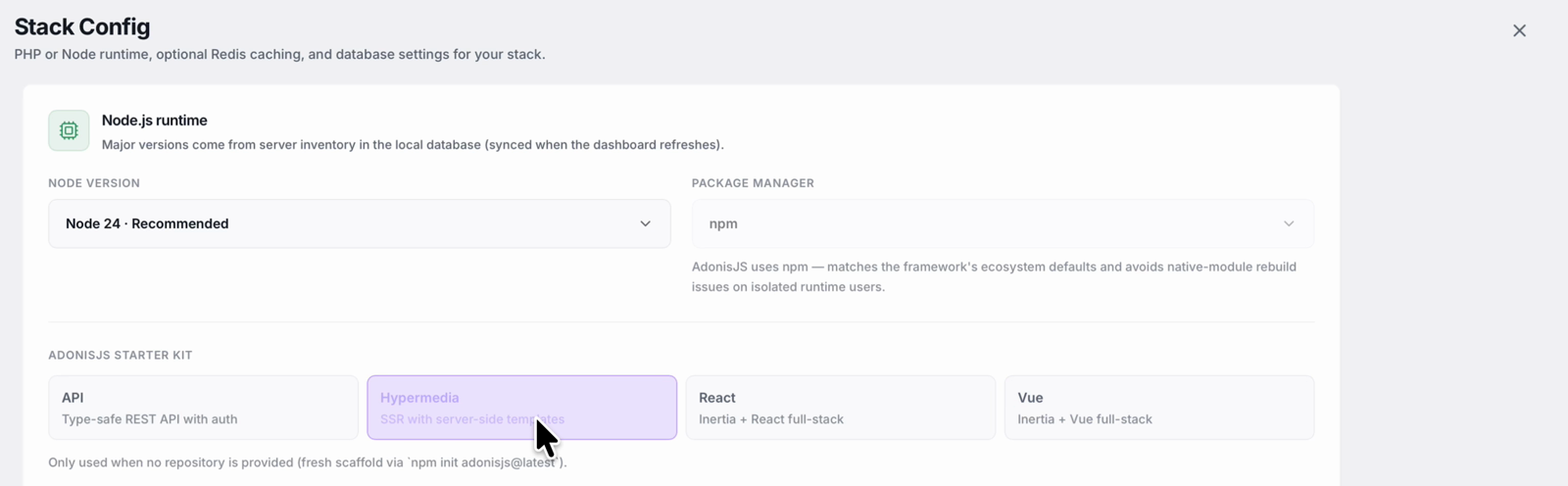
The starter kit is only used when you are not deploying your own repository. With a repository connected, your code is deployed as it is. You can also have StackPilot App create a MySQL or Postgres database for the site, or attach a managed one such as Supabase or Neon.
Step 5: Review and deploy
Launch it and follow the log. StackPilot App creates the isolated user, sets up Node, prepares the release folders and picks a free port for the app. It installs dependencies, writes a production .env with a fresh app key, and builds the app, checking that every frontend asset made it into the build. Then it runs the migrations, switches to the new release and starts it with PM2, set to come back after a reboot.
Before any traffic reaches the new release, StackPilot App checks that the app actually responds on its port. Only then does Nginx start forwarding requests to it. Last comes the SSL certificate. On a small server, the whole deploy took a little over three minutes.
Step 6: Use it
The site page shows its deployment history with one-click rollback. In the demo, the Hypermedia kit's sign-up page works straight away: creating an account uses the users table the migrations just created, which proves the app, the database and the sessions are all working on your own server.
Why this works
- Steps run in the right order. Build, then migrate, then start, then health check, then route traffic. That ordering is where hand-written deploys usually go wrong.
- A health check guards the switch. Nginx only sends traffic to a release that is already answering, so a broken build does not take the site down.
- The process is supervised. PM2 keeps the server running and restores it after a reboot.
- Native modules behave. Using npm for the isolated user avoids a common class of runtime failures.
- Rollback is one click. The last five releases are kept, so a bad deploy is easy to undo.
FAQ
Which AdonisJS starter kit should I choose? API for a backend with no frontend (for example a mobile app), Hypermedia for server-rendered pages with Edge templates, and React or Vue when you want a component-based frontend through Inertia without building a separate API.
Does StackPilot App deploy my existing AdonisJS repository? Yes. Connect your Git repository and your code is deployed as it is. The starter kit setting only applies when StackPilot App creates a fresh project for you.
Does it run database migrations? Yes. Migrations run as part of the deploy, before the new release is started and before any traffic is switched to it.
Can StackPilot App create the database for me? Yes. It can create a MySQL or Postgres database for the site, or you can attach a managed database such as Supabase or Neon.
Why does it use npm instead of pnpm or yarn for AdonisJS? npm matches the framework's own defaults and avoids native module rebuild issues when the app runs under its own isolated user.
What servers does it work with? Any SSH-reachable Ubuntu or Debian VPS from any provider. StackPilot App can also provision a server on AWS, DigitalOcean or Vultr. The app runs on macOS, and Windows is in public beta.
Summary
AdonisJS gives you a lot out of the box, and deploying it well means respecting its production pipeline: build, environment, migrations, a supervised process, a health check, then the reverse proxy and TLS. With StackPilot App you pick the AdonisJS preset, set the domain and SSL, choose a starter kit or connect your repository, and deploy. Everything runs in the right order and stays visible in the log.
Ready to run AdonisJS on your own server? Download StackPilot App. If you also work with Laravel, the Laravel deployment guide covers the PHP side.