An Angular app compiles down to static files. Once it is built, there is no Node server to keep alive: a web server hands out HTML, JavaScript and CSS, and the browser does the rest. That makes Angular cheap to host on a VPS you control, without paying for a platform you do not need.
Getting there still takes some care. The Angular build is heavier than most frontend builds, the output lands in a folder that is easy to point Nginx at incorrectly, and client-side routes need a fallback so they do not 404 on refresh.
The problem
Hosting Angular on your own server involves:
- A Node runtime and a dependency install, used only for the build
- Enough memory for the Angular CLI production build
- Running
ng build, which writes the output todist/<project>/browser - An Nginx server block rooted at the browser build, not the project or the
distroot - A fallback to
index.htmlso Angular Router's deep links survive a page refresh - TLS, and a way to release new builds without breaking the live site
The pain
Memory is the usual first surprise. Modern Angular (version 17 and up) builds with esbuild, and a typical app still peaks at around 1.5 GB of RAM during the production build. Very large apps, or projects still on the older webpack builder, can need 3 to 4 GB. On a small VPS the build slows to a crawl or gets killed without a clear error.
Then there is the output path. Newer Angular versions write to dist/<project>/browser, and pointing Nginx one level too high gives you a directory listing or a 403 instead of your app. Leave out the index.html fallback and every refresh on an inner route returns a 404. Rebuild in place on the live folder and visitors get a broken mix of old and new bundles while it runs.
The traditional way: an honest sketch
The shape of it on a fresh Ubuntu server, as an outline rather than a recipe:
# 1. Install Node, check the server has enough RAM (or add swap)

# 2. Pull the code, install and build
npm ci && npx ng build        # output: dist/<project>/browser

# 3. Nginx server block rooted at dist/<project>/browser
#    with a try_files fallback to /index.html for Angular Router

# 4. certbot for TLS and renewal
# ...plus a release folder scheme if you want zero downtime and rollback
Short on paper, with several places where one wrong path or a missing line leaves you debugging in production.
The StackPilot App workflow
StackPilot App is a desktop app that sets up and manages your own servers. It is not a hosting company: you bring your own VPS and pay your provider directly. It connects over SSH, checks the server before it builds anything, and streams every step to a live log.
Here is a complete Angular deploy:
Step 1: Pick the Angular preset
In Sites, start a new deployment and choose the Angular preset. It brings Nginx, Node and the Angular CLI together.
Step 2: Choose your source
Pick a repository from your Git provider to deploy your own app. If you skip it, StackPilot App creates a fresh Angular app for you.
Step 3: Domain, isolation and SSL
Set the domain or subdomain. Site isolation gives the app its own Linux user, zero downtime mode keeps the last five releases for rollback, and Let's Encrypt provides a free certificate that renews automatically.
Step 4: Stack config, with a memory check
StackPilot App checks the server's RAM before it builds anything, and tells you if the Angular build is likely to be slow:
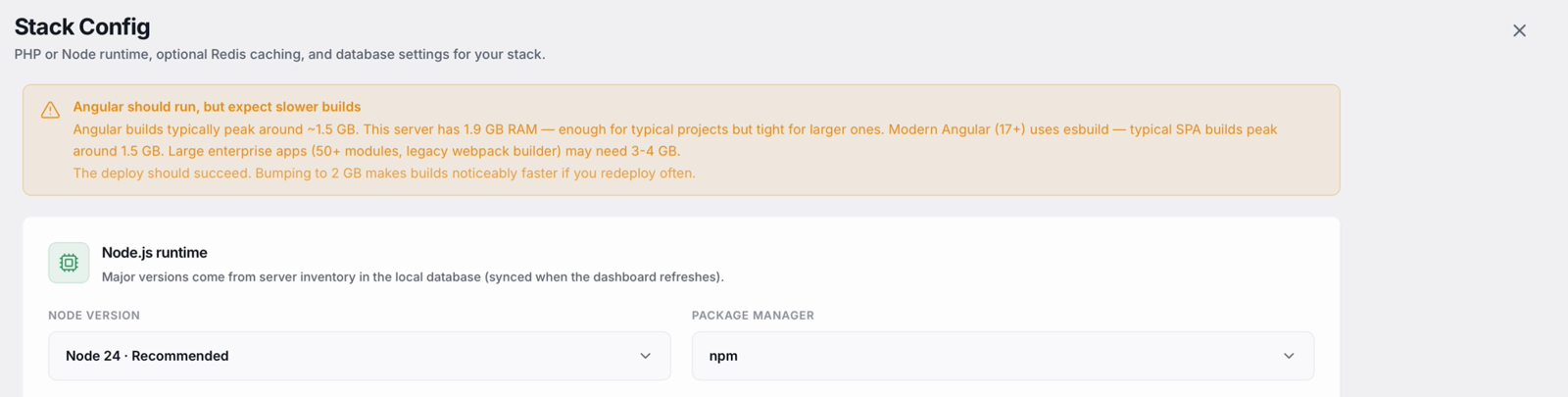
In the demo the server has just under 2 GB, so the deploy will work but builds may be slower. Below the warning, Node 24 and npm are the defaults.
Step 5: Review and deploy
Launch it and watch the log. StackPilot App makes sure Nginx, Node and PM2 are on the server, creates the isolated user, prepares the release folders, and installs dependencies. Then it runs the production build with the Angular CLI, which writes the output to the dist folder.
Because an Angular app is just static files, there is no Node process to keep running. StackPilot App switches to the new release and points Nginx straight at the browser build, with the fallback that keeps Angular Router's deep links working. Then it issues the SSL certificate. In the demo the whole deploy took about two minutes.
Step 6: It is live
The site page shows the deployment history with one-click rollback. Open the domain and the Angular app is live over HTTPS.
Why this works
- The build is checked before it starts. The memory warning turns a mysterious failed build into a clear heads-up.
- Nginx points at the right folder. It serves the browser build directly, with the routing fallback already in place.
- Nothing to babysit. After the build, Nginx serves static files and no Node process stays running.
- Atomic releases and rollback. Every deploy goes into its own folder and switches over in one step. The last five are kept.
- Your credentials stay local. StackPilot App runs on your machine and connects over SSH.
FAQ
How much RAM does an Angular build need? A typical modern Angular app (17 and up, using esbuild) peaks at around 1.5 GB during the build. Very large apps, or those on the legacy webpack builder, may need 3 to 4 GB. StackPilot App checks the server before building and warns you if memory is tight.
Do I need Node running in production for Angular? Not for a standard client-side Angular app. Node is used for the build, then Nginx serves the static output directly.
Will Angular Router deep links work after a refresh?
Yes. Nginx is configured to fall back to index.html for paths that do not match a file, so Angular Router handles them.
Can I deploy my existing Angular project? Yes. Connect your Git repository and StackPilot App builds and deploys it. The fresh app is only created when you skip the repository.
Can I roll back a deploy? Yes. With zero downtime mode on, the last five releases are kept and rollback is one click.
Which servers does StackPilot App support? Any SSH-reachable Ubuntu or Debian VPS from any provider, and it can provision a new server on AWS, DigitalOcean or Vultr. The app runs on macOS, and Windows is in public beta.
Summary
Angular is straightforward to host once it is built, but the build needs enough memory, Nginx has to point at the right output folder with a routing fallback, and releases should be atomic with a way back. With StackPilot App you pick the Angular preset, set the domain and SSL, let it check the server, and deploy. Two minutes later the app is live over HTTPS.
Ready to host Angular on your own server? Download StackPilot App, or read the Vue and Svelte guides for other static frontends.